Lab 9: Dictionaries, Object-Oriented Programming, and Generating Graphs
Goals
After the lab, you should be proficient at
- using dictionaries to solve problems
- creating and testing your own classes from a specification
- developing a larger program using a class to solve a problem
- using a common third-party library to generate graphs
Objective: Review
Review the slides for today's lab.
Objective: Set Up
- Run runHelpClient &
- Copy
/csdept/courses/cs111/handouts/lab9and all of its contents (which means what command-line option should you use?) into yourcs111directory. - Copy
test.pyfromlab8into yourlab9directory.
Objective: Programming in Python
Your programs will be graded on correctness, style, efficiency, and how well you tested them. Make sure you adhere to the good development and testing practices we discussed in class. Your code should be readable and your output should be useful and well-formatted.
- (10) Using a dictionary object, create a program that maps a
letter to an example word that starts with that letter. You must
have at least three entries in your dictionary. Then, print out
the dictionary so that it looks similar to a children's book, and
the keys are printed in alphabetical order. Example output looks
like:
f is for fiddle
g is for goose
z is for zoo
- (35) The most common last names for people in the United States
are Smith, Johnson, and Williams.
(Source: US
Census)
The most common first names for
females over the last 100 years are Mary, Patricia, and Jennifer and for males are James,
John, and Robert.
(Source: Social
Security Agency)
In this program, you are going to count how many times each name occurs among W & L students.
Your program will read in a text file of names (one name per line), count how many times each name occurs in the text file, and print out the names (in alphabetical order) and the number of times each name occurs. (Note that this problem is slightly simpler than what we did in class because we know that the only thing on a line in the file is the name.)
There are five data files in the
datadirectory for you to process. Filetest.txtis provided as an easier first file to test. The remaining four files represent W&L undergraduate's last names, first names, female first names, and male first names.Execute your code on one file. (Start with
test.txt. Later,lastnames.txtfile will be the easiest "real file" to check that your work is correct because the file is in alphabetical order.)You can add the following code to your code to enable some "spot checks" for correctness. Note: the code may need to be modified slightly, depending on how you named variables.
      name = input("What name do you want to check? (hit enter to exit) ")
      while name != "":
          if name in nameToCount:
              print(name, "occurs", nameToCount[name], "times.")
          else:
              print(name, "was not in the data.")

          name = input("What name do you want to check? (hit enter to exit) ")
Hit enter to exit the
whileloop.Next, to make later development a little simpler, refactor your code so that you have a function that takes the name of the file (a string) as a parameter. The function should process the file and return the generated dictionary. The
mainfunction should contain the remainder of the code, including displaying the (alphabetized) contents of the returned dictionary.Finally, modify your
mainto call the function four times, once for each of the data files. (When you hear "for each of", you should think to use what?)Don't save the output from this program--it's too much to print! Just look at the output yourself and verify that it makes sense.
While this is useful output, we can't easily determine the name that occurs most frequently, and we can't see trends in names' frequencies. Which leads us to...
- (20) The reason we can't get the output we want from the
previous program is because we can't tie the name and the number of
occurrences together. We want to sort by number of occurrences, but,
given the number of occurrences, we can't look up the name that has
that number of occurrences. When we want to package and
encapsulate data together, that calls for a new data
type.
(We will tie this class into the last program in problem 4. For now, just focus on implementing this class.)
To address this issue, we will use the
FrequencyInfoclass. The filefreq.pywas provided for you when you copied thelab9directory at the beginning of lab. Complete the implementation in this file. The following specifies the class's attributes and methods:Data:
- a string that represents the "thing" being counted (let's call that the key)
- a count that represents the number of times that the key occurred
Functionality:
- constructor - doesn't return anything. Takes as parameters a
key and a count, and initializes the object's data.
What is the method name associated with the constructor? - string representation - returns a string that has the format:
key
      count
What is the method name associated with this method? getKey()- returns the FrequencyInfo's keygetCount()- returns the FrequencyInfo's countupdateCount()- increments the FrequencyInfo's count by 1
Testing the Class
Let's start by making sure that you understand how to use the class. Follow the examples in the
mainfunction in the Card class within themainfunction:- Create a few
FrequencyInfoobjects. - Print those objects.
- Write tests of the
__str__method, usingtest.testEqual
Complete Implementing the Class
- Complete the implementations of
getKey()andgetCount() - Test that those methods work.
- Test that
updateCount()works. (How will you be able to verify thatupdateCount()works?)
For your output file, show that your tests work.
- (25) Putting it all together.
Copy the second program for this problem.
In this program, you will use your
FrequencyInfoclass to print out the name frequency results that can be used by another Python program to generate graphs.There are two alternatives for leveraging
FrequencyInfos to solve the problem:- (More object-oriented practice) Modify the program so
that the dictionary maps the key (the name) to the value
(the
FrequencyInfoobject). When the program sees a name again, update theFrequencyInfo's count.Then, get the
valuesfrom the dictionary, which you should make into alistofFrequencyInfos.OR
- Go through the dictionary,
creating
FrequencyInfos from the mappings, and adding them to a list.
After you have a list of
FrequencyInfos:- Sort the list by the
FrequencyInfo's count, following the example in the slides. The term "key" has different meanings depending on the context. We were using "key" to refer to the "thing" we were counting. Insort, "key" refers to the metric we're using to sort the objects. - Reverse the list so that the objects are in the order of greatest to least
- Write the list to a file, one at a time, in the following
format:
<name> <count>
For example, an output file for male first names could look like
James 12
John 9
Robert 7
...
The data above is not the correct values for the W&L data.
- Save your output files for each input file in the
datadirectory. You should name the summary files appropriately, such asfemale_fnames_freq.dat. With proper use of functions and some string manipulation, you should be able to easily modify the program to process all four input files in one execution of the program. - Check your output files to verify that your output makes sense and is in the required format.
- (More object-oriented practice) Modify the program so
that the dictionary maps the key (the name) to the value
(the
Objective: Generating Graphs (5)
Now, we're going to use a Python program to create bar graphs of
the data you generated from your programs
using matplotlib, which is useful for generating lots of
different kinds of graphs.
Run the given generateFreqGraphs.py or
modify graphing_example.py to generate the graphs for
each of your data files. (I think
modifying graphing_example.py is the easier
approach.)
Show the top 5 results for each data file. In the case of a tie, show all the tied results.
Save the graphs in your data directory so
that the images do not affect your printing later.
Example generated graph: 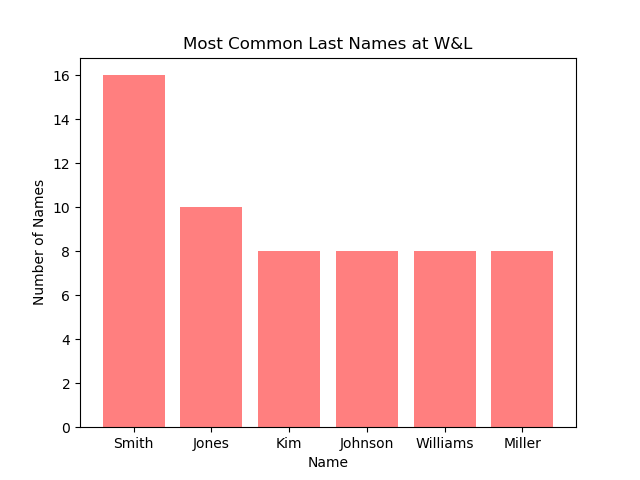
Objective: Creating a New Web Page (5)
This part will be done individually. Do the pair turnin and then make sure both partners have all the code/files.
- Go into your
public_htmldirectory. - Copy your
lab2.htmlorindex.htmlfile to a file calledlab9.html(in thepublic_htmldirectory).
Review the copy command if necessary. - Copy the graphs you created in the last part into your
public_htmldirectory. - Modify the Lab 9 web page (using jedit) to have an appropriate, title, heading, and information.
- Modify your Lab 9 web page to display the graphs you created.
To change the size of the images you can use the
width=attribute to make the graphs be a certain width in pixels, e.g.,width=400 - Discuss what met your expectations and what surprised you about the data/graphs.
- Modify your
index.htmlpage to link to your Lab 9 web page.
Note: Do not display the "old" images from the original index.html or lab2.html pages. Your page should only contain content about this week's lab.
Finishing up: What to turn in for this lab
- When you, as a pair, are ready to submit OR if you are at the
end of the lab period, run
pairturnin.sh labx partnerusername
wherelabxis the name of the lab you are submitting andpartnerusernameis your partner's username on the lab machines (the person whose account you are not using to write the code). For more information about the command, see the wiki.If you want to copy your pairs' work into your
cs111directory--either just to have it or to work on your code on your own--use the scriptindiv_startup.sh. Run this command from the account that you want. For example, run indiv_startup.sh labx partnerusername
wherelabxis the name of the lab you're working on andpartnerusernameis your partner's username on the lab machines.For more info, see the wiki.
- If you complete the lab on your own after the lab
period, submit
your lab into your
turnindirectory, as we had before this lab. - Remove any .pyc files and any graph files (*.png) files from the directory; otherwise, you'll get an error when creating the output file.
- Create the printable lab assignment, using the
createPrintableLabcommand:
createPrintableLab <labdirname> - View your file using the
evincecommand. - Print the file using
the
lprcommand. - Log out of your machine when you are done.
Perform the following steps from
your cs111 directory.
Note that each command
below links to a page with more information about using the
command.
Labs are due at the beginning of Friday's class. You should
hand in the printed copy at the beginning of class, and the electronic
version should be in the turnin
directory before class on Friday.
Ask well before the deadline if you need help turning in your assignment!
Grading (90 pts)
- Python programs: 90 pts; see above for breakdown
- Graphs: 5 pts
- Web pages: 5 pts (both your index.html page and the lab9.html page)